



With millions of searches conducted every day, Google can connect you with thousands, if not millions, of supporters. Google Ads can catapult your nonprofit to the front page of Google Search results almost instantly. Even better, you can do so for free through the Google Ad Grants program.
To participate in this program, however, you need to follow Google’s rules. This beginner’s guide will break down the fundamentals of Google Ad Grant compliance so you can keep your account in good standing.
The Google Ad Grants Program: A Brief Introduction
As part of Google’s corporate philanthropy goals, the Google Ad Grant program provides eligible nonprofits with up to $10,000 per month in free Google Ads credits.
Participating nonprofits can promote content from their websites to Google users searching for relevant keywords. This makes Google Ads a great marketing tool for promoting your donation page, volunteer opportunities, upcoming events, and anything else that will advance your mission, all without the financial burden of paid advertising.
To maintain eligibility, your organization must adhere to specific guidelines, including maintaining high-quality ads and targeting relevant keywords. Not following these rules can lead to suspension. Due to the rules’ complexity, many nonprofits turn to a Google Ad Grants consultant to manage their accounts. These experts know the ins and outs of Google’s regulations and will know how to create high-converting ads that resonate with users.
Website User Experience and Functionality
While not technically part of the compliance rules, a high-quality website is one of the program’s initial eligibility requirements. You need to follow these Google Grant website rules to be accepted into the program:
- Domain ownership: Your organization must own the domain users land on after clicking your ads. You can register a domain by using a registrar like GoDaddy or Google Domains. If your ads direct people to a donation page, content can be hosted by a verified donation processor like Classy, Kindful, or PayPal.
- High-quality website: Your nonprofit’s website must be user-friendly and feature valuable, unique information on your organization’s mission and activities. It must also load quickly, be secured with HTTPS encryption, and not contain broken links.
- No commercial activity or ads: Certain practices are prohibited under the program, such as obtrusive ads and the sale of products or services that don’t directly support your nonprofit’s mission.
These rules enhance people’s experiences on your website, inspiring them to interact with your nonprofit. For Google users, these standards guarantee that the websites they visit through Google Ads are reliable, informative, and relevant to their interests, making them more likely to trust and click on search results ads in the future.
Keywords
Keywords are a vital part of your nonprofit’s Google Ads. Keywords are the words or phrases users type into the Google search bar. Your nonprofit will attach these specific terms or phrases to your ad campaigns. Then, these keywords will trigger your ads on Google’s search engine results pages for relevant searches.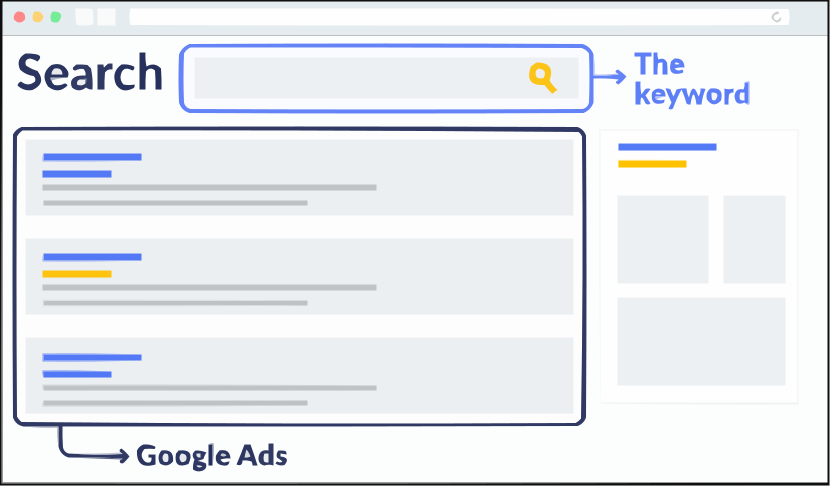
The Google Ad Grant rules for keywords are designed to ensure that ads are relevant, mission-focused, and valuable for both your nonprofit and the users encountering your ads. Getting Attention’s Google Grant keyword guide breaks down the primary rules for keywords:
- No single-word or overly generic keywords. While separate rules, these two are pretty similar. Single-word or otherwise generic keywords are typically too broad to reflect a nonprofit’s mission. For example, an animal shelter shouldn’t target “dog” as a keyword, because it’ll bring up results unrelated to their missions. Instead “adopt a dog” would be a better fit since this keyword would display ads to relevant users. Some exceptions to this rule include brand names and medical conditions.
- No keywords with a Quality Score of 1 or 2. Google has a scoring system that assigns a Quality Score to each keyword based on expected click-through rate, ad relevance, and landing page experience. Think of it as Google’s perception of whether a keyword is relevant to your ads. Any keywords with a score lower than 3 must be paused.
These guidelines help target your ads and ensure that the users who click on those ads are genuinely interested in your nonprofit’s offerings. That way, you can successfully connect with new supporters, steward current donors, and drive your mission forward.
Ad Engagement
The ultimate test of your Google Ads success is whether they inspire action. That’s why Google has rules regarding ad engagement. Here are two key rules that fall under this category:
- Maintain a 5% click-through rate (CTR) each month. This means that for every 100 users who see your ad, at least 5 click on it. A CTR of 5% or higher indicates that your ads are well-targeted and compelling enough for people to want to learn more about your nonprofit’s cause or services. If you have a low CTR, you may need to rewrite your ads to be more compelling, target different keywords, or choose different landing pages to promote.
- Must have valid conversion tracking. Conversions refer to actions people take. Examples include donating, registering to volunteer, signing up for an email list, completing a membership form, or watching a video. To adhere to this rule, you’ll need to install Google Analytics on your website and have at least one conversion per month.
Together, these rules aim to encourage nonprofits to create ads that are not only seen but also engage users. Emphasizing engagement and measurable outcomes ensures that the Google Ad Grants program delivers a return on the time you invest in creating your ads.
Account Structure
To help you understand rules related to account structure, let’s break down the elements of a Google Ad Grants account.
Your account is composed of campaigns. These are your account’s largest building blocks. Each campaign should focus on a specific goal, such as fundraising or volunteer recruitment. Within each campaign, you’ll create multiple ad groups. Each ad group targets specific keywords and houses multiple ads, which contain the individual ad copy and title.
With this in mind, here are the Google Grants guidelines for account structure:
- Have at least two ad groups per campaign. Requiring at least two ad groups per campaign encourages nonprofits to segment their campaign themes or objectives more granularly. For example, an environmental conservation nonprofit might have separate ad groups for “ocean preservation” and “forest restoration” within a broader “conservation projects” campaign.
- Have at least two ads per ad group. This rule requires that each ad group within a campaign contains at least two ads. The rationale behind this is to use A/B testing or split testing, which allows nonprofits to compare different ad variations to see which performs better.
- Have at least two sitelink ad extensions. Sitelinks add links to additional website pages to your ads. Nonprofits Source’s Google Ad Grants guide explains that sitelinks allow your ads to claim more real estate on search results pages, providing more ways to interact with your nonprofit and increasing the chances a user clicks on your ad. Having at least two sitelink ad extensions increases the utility and attractiveness of ads.
These Google Ad Grant rules foster a structured and strategic approach to digital advertising, encouraging nonprofits like yours to continuously optimize ad campaigns for higher engagement.
Program Feedback
All grantees must complete an annual program survey. Essentially, this survey informs the Google Ad Grants team about your experience with the program so they can improve its impact.
Google’s team will send the survey to the email address associated with your Ad Grants account early in the year. Submit yours as soon as possible to avoid accidentally breaking one of Google’s rules. Be sure to also correctly enter your customer ID in the form to ensure your response is linked to your account!
Wrapping Up
The Google Ad Grants program is an opportunity to amplify your nonprofit’s impact. Don’t let it go to waste by ignoring the compliance rules!
Remember, a nonprofit consultant can step in to handle your account and navigate the program’s rules for you. Google Grants specialists stay on top of the latest changes to the program and know how to create high-converting ads. That way, you’ll never have to worry about your account getting suspended and can further your nonprofit’s impact through your ads.